

How to Record Your Track Day: Dash Cams, Helmet Cams and Hands-Free Options Compared
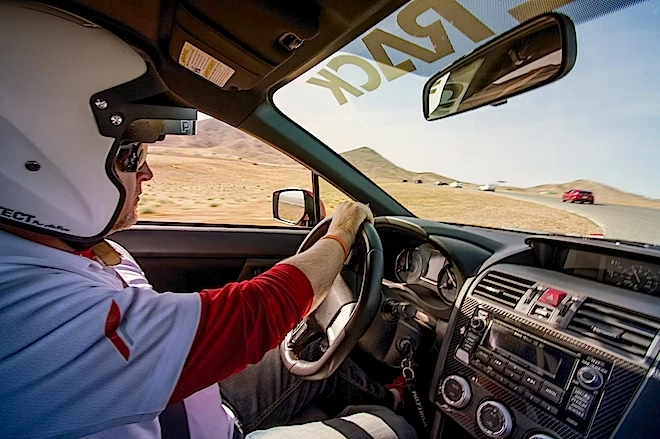
My first track day footage was terrible. I had stuck a cheap action camera to the windscreen with a suction mount, and it came off at the second braking zone. What I got was twenty minutes of the passenger footwell and one clear shot of my own knee.
Since then I have tried most of the common setups at club track days: windscreen mounts, roll-cage clamps, helmet cameras and, more recently, wearable cameras that I use off the track. Each one is good at some jobs and poor at others. Below is how they compare, what I use each one for, and what I would buy first if I were starting again.
Why record a track day at all?
Footage is the cheapest coaching you will get. Most of us believe we are braking later and carrying more speed than we are. Watching the video back shows where you lifted early, where you ran out of track, and where a faster driver went past you.
It is also useful for things that have nothing to do with lap times. If there is an incident, footage shows what happened. If you sell the car later, a record of how it was driven and maintained can help a buyer trust it. And if you change something on the car between sessions, video lets you compare the before and after instead of relying on how it felt.
What does a windscreen or dash-mounted camera do well?
A forward-facing camera mounted inside the car is the most common setup, and for good reason. It shows your line, your turn-in points and the track ahead, which is what you need when you review braking markers.
Good for: reviewing lines, comparing laps, and spotting where you are early or late on the brakes.
Watch out for: suction mounts. Heat, vibration and kerbs all work against them. A screw-down or clamp mount is far more reliable. Also check your organiser’s rules before the day. Many events check camera mounts at technical inspection and will ask you to remove anything that could come loose in the cabin. Novice-focused programmes such as SCCA’s Track Night are a good place to learn these basics, because the rules are simple and the instructors are used to first-timers asking questions.
Is a roll-cage or interior clamp mount better?
If your car has a cage or a solid rear grab handle, a clamp mount behind the driver is my favourite angle. You get the windscreen view plus your hands, the steering inputs and the gear changes. When I first watched mine back, I saw that I was making small steering corrections mid-corner that I did not know about. Fixing them made the car calmer and saved more time than any part I had bought.
Speaking of parts, footage also shows you how the car itself behaves. Wheel hop under braking, a tyre rubbing on the arch over kerbs, or the car squatting more than it should all show up on a rear-cabin camera. If you have changed wheels recently, it is worth reading up on correct wheel fitment before you go out, because a rub you cannot feel from the seat is often obvious on video.
Good for: reviewing technique (hands, steering, gear changes) as well as the line, and catching mechanical issues.
Watch out for: sun glare through the windscreen washing out the picture, and wide-angle lenses making the track look faster and wider than it felt.
Are helmet cameras worth it?
Helmet cameras give you the most immersive footage, because the camera follows where you look. That is useful: you can see whether you are looking far enough ahead through a corner, which is one of the most common mistakes beginners make.
I would still be careful with them. A camera stuck to the outside of a helmet can change how the helmet behaves in an impact, and some helmet makers advise against adhesive mounts. Your helmet was tested and certified in the condition it left the factory, and organisations such as the Snell Foundation publish the standards that testing follows. Anything you bolt or glue on afterwards was not part of that test. Some organisers do not allow external helmet mounts at all, so check before you stick anything on, and if in doubt, use a mount inside the car.
Good for: checking eye position and where you are looking.
Watch out for: helmet safety and organiser rules. Footage can also be shaky on bumpy circuits.
What about recording everything that happens off the track?
This is the part I did not think about at first, and now it is some of the footage I value most. A track day is not only the twenty-minute sessions. There is the drivers’ briefing, the track walk, conversations with instructors in the paddock, and time spent at the fence watching faster cars through the corner you are struggling with.
For a while I tried to film all of that on my phone, which meant holding it up, missing half of what was said, and ending up with footage of people’s backs. These days I wear AI glasses with a built-in camera for the parts of the day that happen on foot. They record from eye level and keep my hands free, so on a track walk I can film an instructor pointing out the turn-in for a tricky corner while I keep my attention on where they are pointing. Because they are sunglasses first, they also deal with the glare in an open paddock, which matters more than you might think on a bright day.
I have also used them on a passenger ride with an instructor, where you want to watch their hands and eyes without a phone in the way. Watching that clip later, with the instructor’s comments over the top, taught me more about one corner than a full session on my own.
To be clear, they are not something to wear while you drive on track. They do not go under a helmet, and they are no substitute for a properly mounted in-car camera. Their job is everything around the sessions.
Good for: track walks, instructor briefings, passenger rides and paddock footage.
Watch out for: other people’s privacy. Ask before you record instructors and other drivers up close, especially in the paddock.
What audio and data should you capture too?
Video on its own only tells half the story. These are the things I now add:
- Engine and tyre audio. A camera microphone inside the car picks up engine note and tyre squeal, which helps you hear when you are over the limit.
- Lap timing and GPS data. A phone app or a dedicated data logger overlaid on video lets you compare speed through each corner, lap by lap.
- Voice notes. Straight after each session, I record a minute of thoughts while they are fresh: where the car felt loose, where I lost my nerve, and what I want to try next time.
Data becomes more useful as you start changing the car. If you move to stickier tyres or different wheels, comparing corner speeds before and after tells you whether the change helped. It is the same reason some grassroots drivers are switching to beadlocks: each change is easier to judge when you have numbers to compare.
Which setup should you start with?
If you are buying one thing, get a well-mounted camera on a clamp, not a suction cup, either facing forward or mounted behind the driver. That covers your line and your braking, which is where most beginners find the most time.
Once that is sorted, add data logging, then think about how you will capture the learning that happens away from the car. My own kit is now one cage-mounted camera, a GPS lap timer, and a hands-free wearable for the paddock and track walk. It took me about a dozen track days to get there, and I would have improved faster if I had started that way.
Frequently asked questions
Can I use my phone as a track day camera?
Yes, if you have a solid mount and a way to stop it overheating. Phones get hot behind glass in direct sun, so check your footage partway through the day.
Do track day organisers allow cameras?
Most do, but rules on mounts vary. Expect your mount to be checked at technical inspection, and ask about helmet cameras in advance.
Is it fine to record other drivers?
On-track footage is generally accepted at track days, but ask before recording people up close in the paddock or during briefings, and check the event’s terms.